The tutorial is long! Please make yourself comfortable and save it for future reference. In this tutorial, you will learn:
Why Choose WordPress?
WordPress is a blogging content management system (CMS) that powers 25% of all websites. One of every four websites runs on WordPress.
WordPress Benefits
- It is FREE for everyone. There is no other platform (not even close) with so many free themes, layouts, and add-ons.
- Easy to use. WordPress is perfect for non-technical people and beginners. All of the people I’ve trained find it easier than they imagined running a blog.
- It’s HIGHLY customizable. There are thousands of free themes and plugins you can choose from. WordPress customization opportunities are limitless. You must pay anywhere from hundreds to thousands of dollars to get the same functionality.
- WordPress is secure. Governments use it to show business stars.
Domain Name
The first thing you should do is choose a great domain name for your blog. This is the address you type in your browser. Here are my tips on how to do this:
- Brainstorm 5 Top Keywords – When searching for a domain name, create a small set of terms or phrases that describe your idea. This will help you to find your perfect domain name. Once you create this list, you can start pairing these terms, adding prefixes & suffixes, or even combining them with other words, not on your initial list. Play around until you find a good match.
- Use A Domain Selection Tool – If you still need help brainstorming some domain name ideas, you can use a tool like Domainr. Just remember you can use this tool to find a domain name and then go and get it for free with your best web hosting company.
- Easy to Remember – Your domain name should be short, catchy, and easy to type and remember. One or two words are perfect; three words are the absolute maximum.
- Make The Domain Unique – Having a unique domain name is crucial. You don’t want to confuse your website with another popular or lousy one. Never choose a domain that is simply a plural version of another website. Having your website confused with a popular site already owned by someone else is a recipe for disaster.
- Branded Domain – Always choose a brand over a keyword-based domain. You will make the smarter choice if you have a company or are just starting a website about a specific topic. Get a brandable domain over an exact or partial keyword match domain. According to Nielsen, branded websites are the 3rd-most-trusted advertising source for internet users, tied with editorial content. We trust brands. Treat your domain name as a brand name, not a keyword. Furthermore, domains containing only keywords are used for spam, and Google is suspicious about exact or partial match domains. Exact match domain, for example, means that if you want to rank on Google for dog walking services in Chicago to pick a domain, the name dogwalkingservicesinchicago.com
- No Hyphens and Numbers – These domains are hard to remember and don’t sound credible. Most domains with hyphens and numbers are usually bad with spam and phishing. Most importantly, they also correlate poorly with rankings in Google, branding, and traffic.
Domain Extensions
- A .com top-level domain – TLD is ideal because it is most popular among internet users. Your second-best option is a .net domain. These two are the first and most popular TLDs
- .Org is suitable only for running an organization, but you can use it for a blog.
If you plan to target a particular country, consider a country-specific domain such as “co.uk” for the United Kingdom. There are 100s of new top-level domains launched in the last few years, but I strongly advise you to stick to the most popular of those: .com. and .net.
The main reason is that there are insufficient case studies if these new TLDs rank well on Google’s organic rankings.
For example, .info domains were used by spammers and black hat marketers for years to rank websites on Google, but since 2012 when Google launched their Penguin and Panda updates, you rarely see .info domains ranking on Google’s first page of search results.
Several other TLDs you can consider
- .co: an abbreviation for company, commerce, and community.
- .net: technical, Internet infrastructure sites.
- .org: non-commercial organizations and nonprofits.
- .biz: business or commercial use, like e-commerce sites.
- .me: blogs, resumes, or personal sites
- .club: suitable for a niche community
Best Hosting For Your Domain
Web hosting is where you keep your blog’s files (blog posts, images, etc.). Without a web hosting service, you can not use your domain name.
It must be connected to a web hosting provider to appear online and in search results. You should make no compromises when choosing a hosting provider because your blog or website performance will suffer.
Common problems with bad hosts:
- Outages – times when your website is down. Your visitors won’t be able to access your blog.
- Speed – Cheaper hosts usually use old equipment, and your website loading speed decreases. This will also lower your Google rankings as website speed is an important ranking factor.
- Security – Cheapest providers don’t maintain high security standards. As a result, your website may be hacked or infected with adware, or injected with invisible backlinks. All this will force Google to exclude your blog from their results temporarily or forever. Keep in mind ~50% of the world’s internet traffic goes through Google’s search engine.
How to set up your WordPress blog
In this section, you will learn the basics:
- I will show you how to use the WordPress dashboard
- How to change your blog’s design
- How to install new plugins/features and optimize your blog for SEO
After your first login, you need to activate your blog because it will display the default “Coming Soon” page.

WORDPRESS DASHBOARD
This is the area on the right from the black vertical menu. It shows you an at-a-glance look at your recent activity, including how many posts, comments, and pages you have. You can also write up a quick draft blog post here.
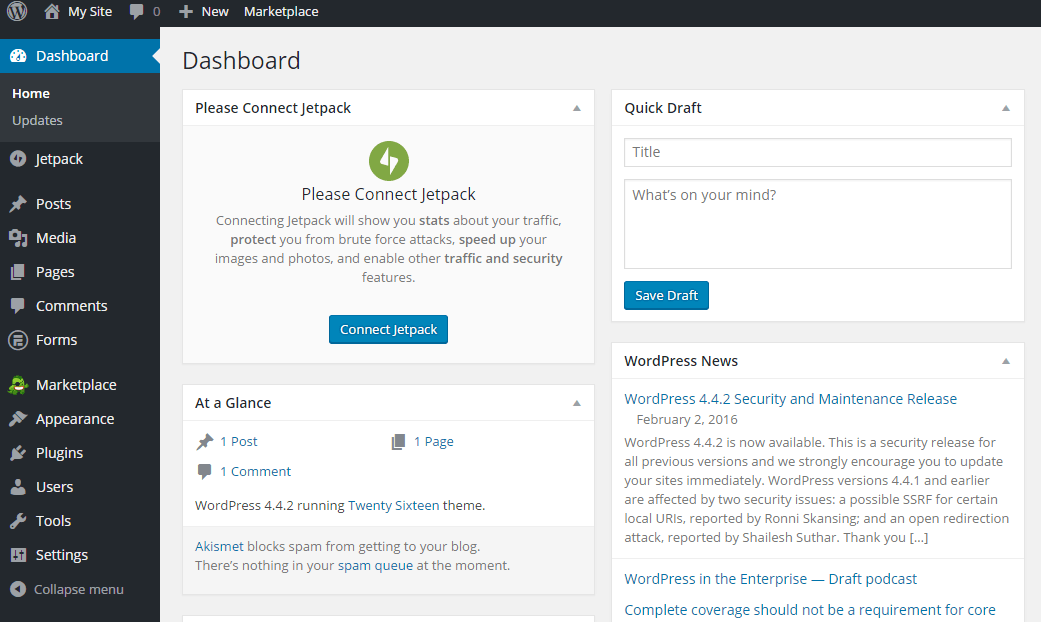
You can modify your dashboard’s look when you click on “Screen Options” at the top right of your screen.
Now let’s break down some of the most important functions of the navigational menu on the left:
- “Posts” is where you add a new blog post or edit an existing one.
- “Media” is your media library with all the pictures, videos, and audio files you’ve uploaded to the site. You can add or delete your files here.
- “Pages” – You can add a new page to your blog. You should use these for about and contact information pages, your services, etc.
- “Comments” – This is where you manage your comments.
- “Appearance”– You can edit and customize your design and install new themes and layouts here. I will show you how to use it later in the tutorial.
- “Plugins” – The best part of WordPress. They allow you to add different functionalities to your blog with just a click — more about it in a minute.
- “Settings” – From this section, you can change your site’s title and tagline, make your articles’ URL SEO friendly, and other essential settings. I will show you the best practices in the detailed guide later on this page.
Initial Blog Settings
These settings are very important configurations you should do before you proceed with anything else.
Blog Name
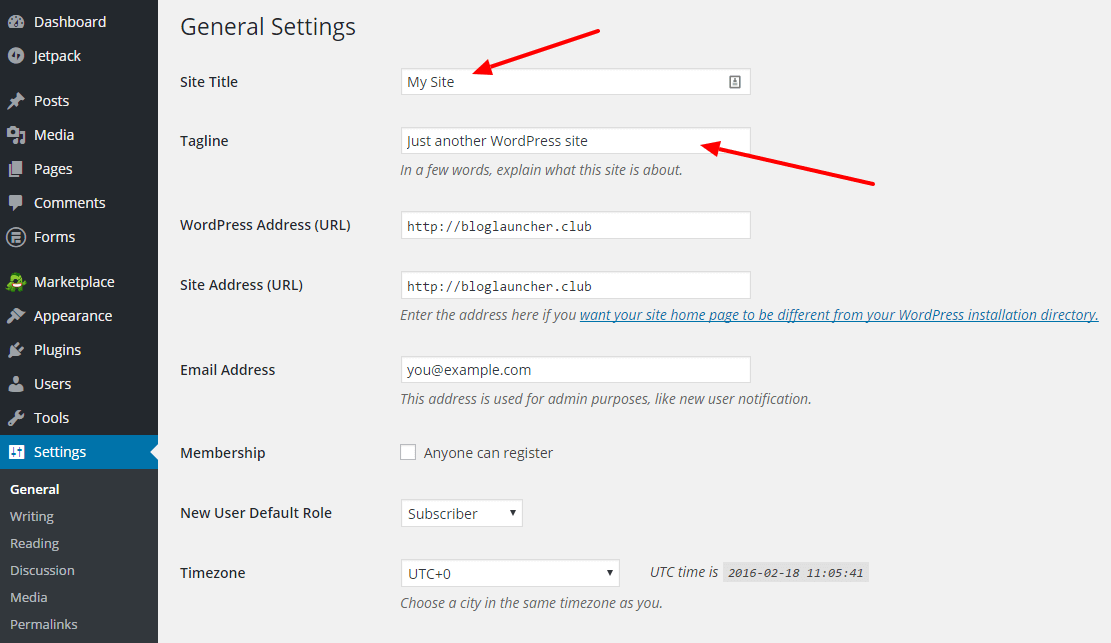
You should change your blog title and tagline to something meaningful that tells the readers about your blog. This will also help Google determine what your blog is about, and this can also help you with your organic rankings. To access the screen below, click “Settings” bottom left and click General.
SEO Friendly URLs
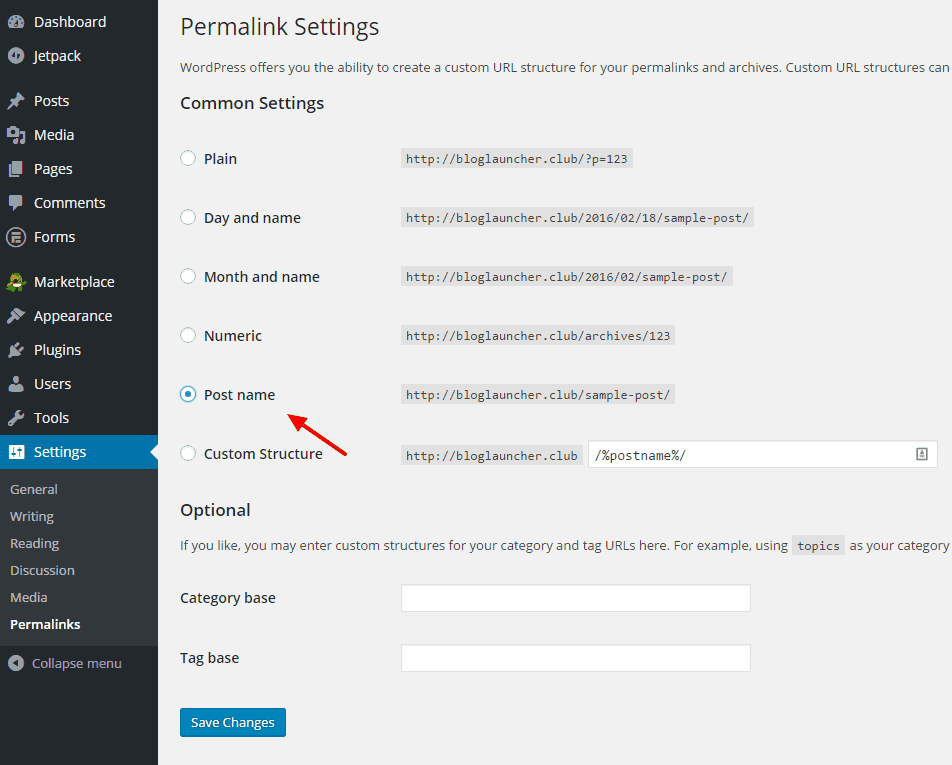
By default, WordPress URL addresses are ugly and not SEO-friendly. You need to change them. Go to “Settings” again and click on “Permalinks” and choose “Post name.” This will help you with your on-page SEO and boost your organic rankings in Google.
About And Contact Pages
Every blog needs an “about” page where you tell a little about yourself and your mission. Contact pages usually have a form where your visitors can reach you. I will later show you how to install a free contact form plugin in this guide.
BLOG DESIGN
To change your design, click “Appearance” and select “Themes” from the sub-menu. After that, click on WordPress.org Themes.
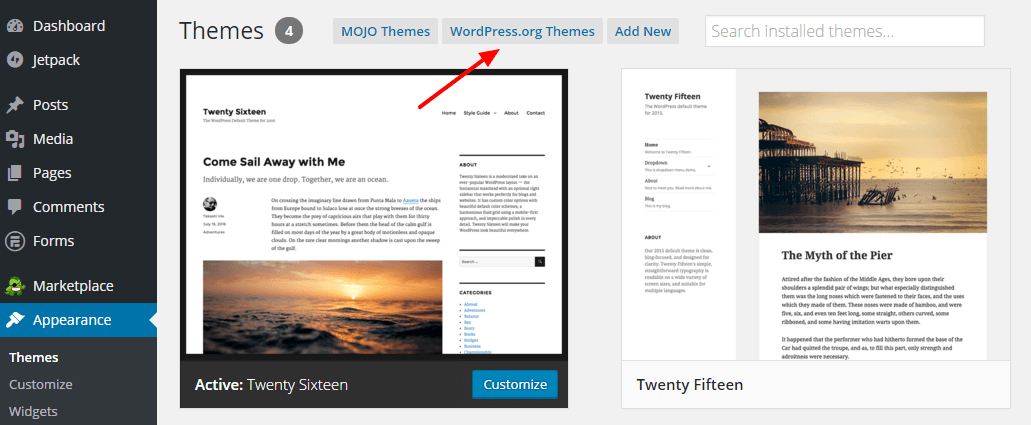
All of these themes are free! You can sort the designs by different filters and search for specific keywords to find the best design that suits your needs.
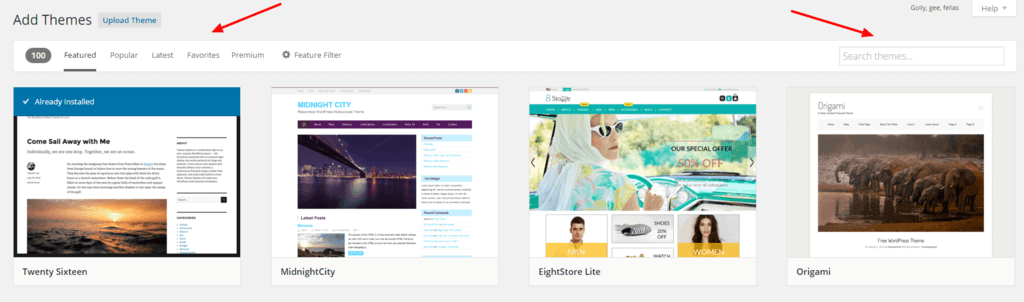
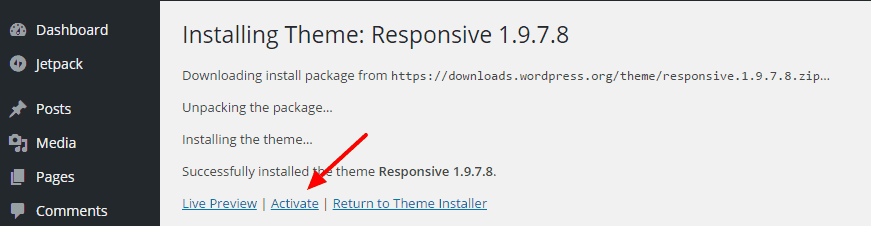
When you find your theme, click on “Install” and activate it from the next screen. The installation will redirect you.
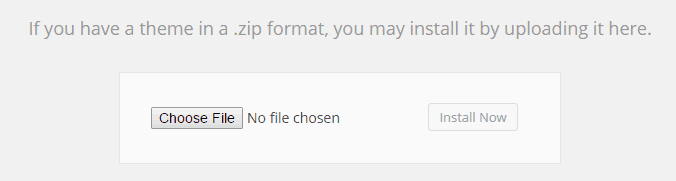
If you want a premium design, I can recommend two marketplaces where you can find the best WordPress themes and plugins for your money. ThemeForest is one of the best places. After you purchase and download your theme, go to Appearance – Themes – Add New and upload and install your new blog theme.
Customize Themes
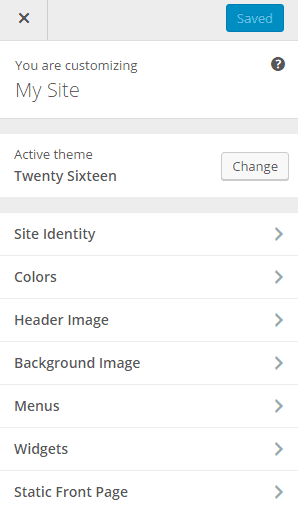
Additionally, you can customize the theme you pick from the appearance area.
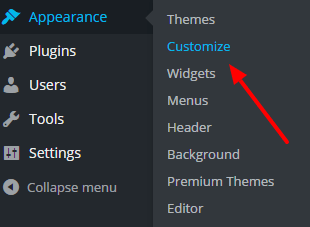
You can change your site icon, blog colors, header, and background images from here. You can also create different menus for your blog, add or remove widgets, and choose a static page to display as your blog’s home page or for your latest blog posts.
Widgets
WordPress blog widgets are small blocks that have a specific function. You can add these widgets to your sidebar, which is usually on the right side of your blog.
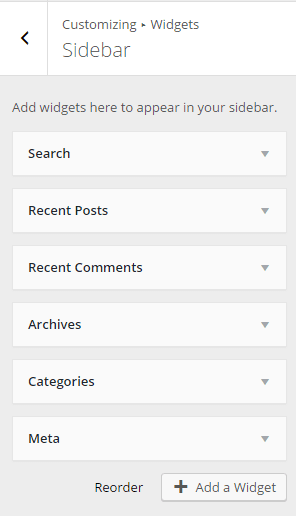
They are also accessible from “Appearance” – Widgets. Drag and drop all available widgets on your Sidebar and Footer area.
Blog Plugins
Plugins can add thousands of functionalities to your blog. To add one, go to Plugins – Add New. You can browse the WordPress plugins database sorted by categories on the left or use the search function on the right to find exactly what you need. Before installing a plugin, check its description to gauge whether it is compatible and tested with your WordPress version. You can also search for plugins in the WordPress plugin directory – wordpress.org/plugins/

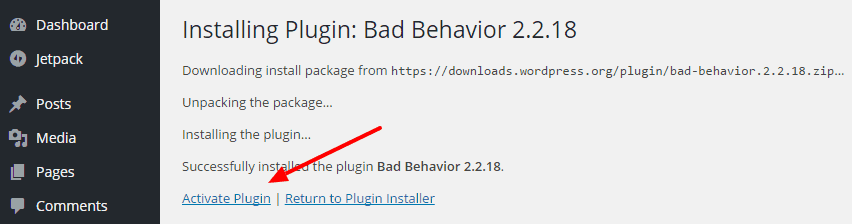
After you pick a plugin, click Install and then Activate Plugin.
- SEO Plugins
Yoast SEO helps improve on-page SEO for your WordPress blog.
- Security Plugins
Lockdown WP Admin conceals the administration area (wp-admin) and wp-login from intruders. It offers an alternate URL to access the WordPress back end and protects the blog by issuing a 404 error to those not logged in. Bad Behavior keeps your blog free from link spam and malicious activity. Anti-Spam by CleanTalk protects the blog from spam comments and registrations by quickly comparing data in the cloud. Spam comments are disallowed while real visitors’ comments are published.
- Comments/Contact Plugins
Akismet analyzes comments, trackbacks, and pingbacks against their resources to determine if the information provided is spam.
- Speed
W3 Total Cache increases server performance and download times, improving user experience and website speed. a3 Lazy Load – This plugin improves your blog performance and load times. It also reduces server bandwidth by only loading images when they are visible when the visitor scrolls your pages. WP Smush strips images of bulky information, reducing file sizes without compromising quality.
- Backup Plugins
BackWPup – Secure your blog and schedule automatic backups of your blog installation.
- Contact Plugins
Contact Form 7 is a simple and reliable solution for your contact page.
- Optional Plugins
Google Analytics Dashboard Plugin allows users to track stats, website speed, and pageviews from a single plugin. Jetpack allows users to manage traffic, image performance, and add security to their blogs.
Blogging Best Practices
How Are People Using Blogs?
In terms of blogging categories, they commonly fall into the following groups:
- Personal blogs, journals, or diaries: Bloggers who fall into this category share their own life experiences and anecdotes with their readers. The point of personal blogs or diaries is to allow the writer to share anything they want to, no matter the topic. Some of these blogs focus on specific topics, such as parenting or work diaries, but they all highlight the personal aspect of the blogger’s life. The posts contained in these types of blogs may be re-purposed later for a biography, but the focus is always the same: personal stories.
- Hobby or special-interest blogs: Hobby bloggers are people who blog about crocheting, video game playing, coin collecting, comic books, and sports, all of which fit into a specific theme. This genre includes beauty bloggers, jewelry makers, and bakers. The writers of these websites are looking for an audience with similar interests.
- Professional blogs: Professional bloggers create their blog websites for the simple purpose of making money online. The blogs in this category are geared to generate revenue for the website owner. These blogs will display advertisements, affiliate links, and paid reviews.
- Corporate blogs: These blogs are created for use by companies or businesses. Corporate blogs on the company’s main website contain general information of interest to consumers or shareholders. Topics covered on corporate blogs may involve items of interest to the company’s employees, product launch news, or the company’s efforts in community relations.
- Community blogging portals: Community blogs offer location-specific information to residents of a particular area. Local neighborhood watch blogs fall into this category and usually cover interest items for those nearby.
Strategies for Blogging Success
Whether or not you’re successful as a blogger can mean various things to different people. While a personal blogger might consider success to mean receiving five-hundred page views in a day, success to a professional blogger means earning enough income for the month.
Despite your definition of blogging success, blogging in any category takes a lot of hard work to achieve greatness. Your level of success may depend on you, and it could involve any number of writers, marketers, and other experts. A successful company can use a blog to showcase the personality of the company or business while offering useful products and services.
Establishing Blog Authority
Your blog’s authority can be established and built up to maintain your influence over a particular niche no matter your industry. When your blog becomes a trusted source of useful and interesting information, your authority grows. Before blogging, create a plan of attack that encourages growth in your area of expertise.
Self-hosted blogs offer many options when it comes to the type of content of which you can write as well as advertisements you may place. Self-hosting your blog is the easiest option and should be treated as an essential part of the business.
How to Create Content That Works
- Create an editorial calendar to establish a blogging schedule. Content creation does not have to be a daunting task for your industry-specific updates.
- Plan your content to have a good idea of what your future customers want.
- Create content that answers your customers’ questions. In doing so, you further your company’s authority in your niche and become a source for useful information.
- Consider what your readers want from your blog and create content that accommodates them.
Style and Branding:
In blogging, you are allowed to establish your writing style while focusing your marketing efforts on branding. Create content that showcases your brand without veering away from your own voice.
Posting-Frequency:
As we’ve said above, your best bet is to create an editorial calendar of which you want to use in content creation. People who abandon their blogs tell their visitors that there is nothing new or exciting about their product or service. Blogging frequency matters in that your visitors will become accustomed to the frequency with which you create new articles. In reading your content, they may come to expect specific types of content from you regularly. If you need help with content creation, you can use content creation marketplaces such as HireWriters.com.
Visitor Comments and Engagement:
- When starting out, you may be sad in thinking that your mother is the only one who reads your blog. When readers comment on your blog, it really comes to life.
- Always respond when you get comments on your blog’s articles or posts. If a consumer, reader, or employee took the time out of their day to read what you’ve had to say, then you, at least, owe them some reply or explanation.
- When readers comment and share their opinions and views with others, chime in with your expertise if you have anything useful to add. Readers love engagement and want to know that your company is listening.
- Comment moderation is an essential aspect of the reader engagement process. Set aside a specific time every day to read comments, reply to readers, and to moderate comments. Comment moderation allows you to weed out information deemed useless, self-serving (spam), or defamatory to others.
- If your blog is popular, then it is a good practice to have a moderation process in mind. This might allow for comments to be automatically approved if the author has been approved.
- Having visitors log in to your blog to leave comments might cut down on the spam created, but it also cuts down on engagement.
- Reader engagement through comment replies and moderation is an ongoing and necessary process for highly trafficked websites.
- Consider creating a commenting policy on your website that outlines the rules for those wishing to leave their thoughts and opinions. This sets the stage for your visitors to know what is acceptable in commenting on your blog.
- This also tells visitors that you will not allow them to be ridiculed or treated poorly while they visit and comment on your website.
Blogging Success – What it Looks Like
No matter how you look at it, every blogger has the same goal: to have their opinions, values, and information read by the largest audience possible. The sky is the limit when you become a trusted authority in your niche.
Get Traffic To Your Blog in 2026
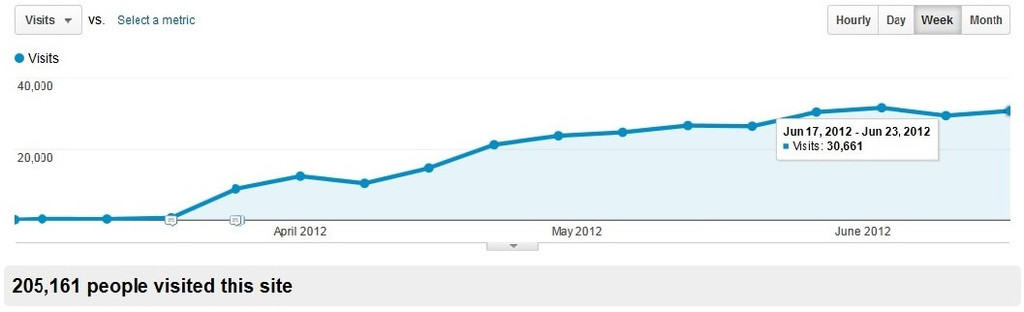
When running a website or a blog, the question that gets asked more than anything else is how to generate more traffic. This doesn’t have to be a daunting task and with these handy tips, you’ ll be well on your way to creating tidal waves of traffic to your website. There are many ways to increase your blog traffic, and while some may seem obvious, I will provide a detailed breakdown of each.
When running a website or a blog, the question that gets asked more than anything else is how to generate more traffic. This does not have to be a daunting task – with these tips, you will be well on your way to creating tidal waves of traffic to your website. There are many ways to increase your blog traffic, and while some may seem obvious, each one comes with a detailed breakdown and actionable steps to put it into practice immediately.
1. Content is King
Create content that truly helps your visitors. Content is king in attracting readers who will come back to your website for more, and it helps establish your reputation as a thought leader in your field. Before you write anything, ask yourself: “Does this solve a real problem for my reader?” Research the most common questions in your niche using tools like AnswerThePublic or Google’s “People Also Ask” section, and build your posts around direct, thorough answers. The more genuinely useful your content is, the more likely readers are to bookmark it, share it, and return.
2. Create Great Headlines for Your Articles
Great headlines drive traffic and encourage visitors to click to read more. Using a proven headline formula is the key to crafting titles that appeal to your audience and perform well in search results. Try formulas like “How to [Achieve Result] Without [Common Pain Point],” “X Reasons Why [Common Belief] Is Wrong,” or “The Ultimate Guide to [Topic].” Use free tools like CoSchedule’s Headline Analyzer to score your headlines before publishing. A headline that scores well emotionally and intellectually will consistently outperform a bland one, even if the body content is identical.
3. Create 10x Content
Create content that is ten times better than anything your competition currently offers on the same topic. This will distinguish you as a clear leader in your niche and earn the kind of backlinks and shares that mediocre content never will. Start by Googling your target keyword and reading every top-ranking article. Identify the gaps – what did they fail to explain? What questions did they leave unanswered? Then write a post that covers the topic more completely, with better examples, clearer formatting, updated statistics, and original insights. Length matters less than depth, but comprehensive posts above 2,000 words consistently outrank shorter ones for competitive keywords.
4. Set a Writing Schedule and Stick to It
To gain more exposure to your content, you need to be consistent. Visitors and search engines alike reward websites that publish on a reliable schedule. Decide on a realistic publishing frequency – whether that is once a week, twice a month, or daily – and block time in your calendar specifically for writing. Treat it as a non-negotiable appointment. Use a simple content calendar in Google Sheets or a tool like Trello to plan your topics at least four weeks ahead so you are never staring at a blank page wondering what to write next.
5. Write List Posts
Writing a list post is a reliable way to attract visitors to your website. List posts are enduringly popular and have great potential for going viral because they are scannable, easy to digest, and promise clear value upfront. Titles like “17 Ways to…” or “The Top 10 Tools for…” perform strongly in both social sharing and search. When writing list posts, give each item enough detail to be genuinely useful – do not just name things, explain why they matter and how to use them. Adding a brief summary at the top also helps readers decide quickly that the post is worth their time.
6. Link to Your Older Content
Linking to your older content reminds visitors that your archive is full of valuable material beyond the current post. It reduces bounce rate, increases page views per session, and sends positive signals to search engines about the depth of your site. Every time you write a new post, make a habit of linking to at least two or three relevant older articles naturally within the body. Go back periodically to older posts and add links to your newer content as well – this internal linking structure helps Google crawl your entire site more efficiently and can give older posts a fresh rankings boost.
7. Interview Experts in Your Niche
Reaching out to well-known experts in your niche for interviews is one of the fastest ways to earn credibility and exposure. It signals to readers that your website is a trusted source, and it encourages the featured expert to share your content with their own audience – giving you a direct line to a pool of highly relevant new visitors. Start by identifying ten to fifteen experts in your field and send a short, personalized email explaining who you are and what value the interview will bring. Keep your questions specific and insightful rather than generic. Publish the interview as a blog post, a podcast episode, or both for maximum reach.
8. Create How-To Articles
There are always people on the internet searching for the best way to accomplish their goals, and how-to articles place your website directly in the path of that traffic. They demonstrate your expertise, build trust, and tend to rank exceptionally well for long-tail keywords. When writing how-to articles, break the process into clearly numbered steps, include screenshots or images where relevant, and anticipate the most common mistakes readers might make. End the post by inviting readers to share their results or ask follow-up questions in the comments – this builds engagement and generates ideas for future posts.
9. Link Out to Your Sources Generously
If you want to get noticed by those whose opinions you value, reference their work and let them know. Generous outbound linking builds goodwill, increases your credibility with readers, and often results in the people you mention sharing your post with their own audience. After publishing a post that cites someone, send them a brief, friendly email or tag them on social media letting them know they were featured. Most people appreciate the recognition and a significant percentage will share the article, expanding your reach to an entirely new audience at zero cost.
10. Use Relevant Keywords
If you are trying to attract a specific audience, researching the right keywords is essential. Keyword research ensures that the content you spend hours creating actually gets found by the people you are writing for. Use Google’s free Keyword Planner, or tools like Ubersuggest or Ahrefs Free Keyword Generator, to find the specific phrases your ideal reader types into search engines. Look for keywords with a reasonable search volume but relatively low competition – these are the sweet spots where a new or mid-sized blog can realistically rank. Place your primary keyword naturally in the title, first paragraph, at least one subheading, and the meta description.
11. Use SEO
Search Engine Optimization is an important and non-negotiable part of growing organic blog traffic. Without basic on-page SEO, even excellent content will struggle to be found. Install a plugin like Yoast SEO or Rank Math if you use WordPress, and follow its checklist for every post you publish. Beyond on-page basics, focus on building backlinks by contributing guest posts to reputable sites, earning mentions from journalists via HARO, and creating link-worthy resources like original research, data-driven posts, or comprehensive guides. Consistently improving your site’s technical SEO – page speed, mobile optimization, and structured data – will compound your rankings over time.
12. Use Proper Spelling and Grammar in Your Articles
Poor spelling and grammar erode reader trust faster than almost anything else. Errors create friction, distract from your message, and signal a lack of professionalism that causes visitors to leave without converting into subscribers or return readers. Before publishing, proofread your post at least twice – once on screen and once by reading it aloud to catch awkward phrasing. Use tools like Grammarly or Hemingway Editor to catch errors your eyes might miss. If writing is not your strength, consider hiring a freelance editor on Fiverr or Upwork for final polish on your most important posts.
13. Use Visual Content (Pictures and Videos)
Articles that contain relevant images and embedded videos increase time-on-page and reduce bounce rates significantly. Readers process visual content far faster than text, and a well-chosen image can communicate an idea more effectively than several paragraphs. Aim to include at least one image every 300 to 500 words in long-form posts. Use free tools like Canva to create custom graphics, and source royalty-free photos from Unsplash or Pexels. Adding alt text to every image not only makes your content accessible to visually impaired users but also gives search engines additional context to rank your pages.
14. Allow Others to Guest Blog on Your Website
Allowing niche experts to guest post on your blog creates a double audience effect – your existing readership gains new perspectives, and the guest brings their own followers to your site. It also reduces the content creation burden on you, allowing you to maintain a consistent publishing schedule even during busy periods. Create a clear “Write for Us” page outlining your submission guidelines, preferred topics, and what contributors can expect in return. Always vet guest posts carefully for quality and originality before publishing, and ensure that any outbound links in the post point to reputable, relevant sources.
15. Guest Blog on Top Industry Blogs
Guest blogging on established blogs in your niche is one of the most effective ways to build backlinks, grow your audience, and establish authority – all at the same time. A single feature on a high-traffic site in your niche can drive hundreds of targeted new visitors to your website in a single day. Identify the top ten blogs in your niche and study what content performs best on each. Pitch a unique, well-researched idea that fills a gap in their existing content. Include a short, compelling author bio with a link to a high-value lead magnet on your website to convert as many of those new visitors into email subscribers as possible.
16. Write a Round-Up Post
Round-up posts are an excellent way to create compelling content quickly while simultaneously building relationships with industry influencers. By featuring insights, quotes, or tips from multiple experts in a single post, you produce a rich, varied piece that multiple people will want to share. Email each contributor after publishing to let them know the post is live. Most will share it with their audience, giving your post immediate reach far beyond your usual readership. Tools like BuzzSumo can help you identify the most influential voices in your niche worth featuring.
17. Enable Website Comments and Reply to All of Them
Make sure that your blog comments are enabled so that visitors can share their opinions and questions on your articles. An active comments section signals to both visitors and search engines that your content is generating genuine engagement. Set a personal rule to respond to every comment within 24 to 48 hours. Even a short, thoughtful reply shows readers you are present and care about the conversation, which encourages them to return. Use comment discussions as a goldmine for future article ideas – if the same question keeps coming up, there is your next post.
18. Always Reply to Visitor Correspondence and Questions
If visitors reach out via blog comments, email, or social media, always take the time to reply. Prompt, helpful responses show that you are accessible and invested in your readers, which builds loyalty and trust that no advertising budget can buy. Set aside fifteen to thirty minutes each day to work through any outstanding messages. Where appropriate, turn frequently asked questions into full blog posts – this deepens your content library while publicly demonstrating your expertise. Readers who feel seen and heard are far more likely to become long-term subscribers and advocates for your blog.
19. Hold a Contest or Giveaway on Your Website
Creating a contest or giveaway on your website encourages visitors to read, engage with, and share your content. The prize does not need to be expensive – digital products, consultations, or sponsored items work very well. Use a tool like KingSumo or RafflePress to run and manage the contest directly on your site. Require participants to share the contest post or refer a friend as one of the entry conditions – this organic sharing mechanic can dramatically multiply your reach with minimal additional effort. Always promote the contest via your email list and social media channels to maximize participation.
20. Use Videos to Keep Users on Your Website Longer
Embedding videos on your website is one of the most effective ways to increase average session duration, which is a key metric search engines use to assess the quality of your content. Even a simple two to three minute video summarizing a blog post can double the time visitors spend on that page. Create your videos using a smartphone and free editing tools like CapCut or DaVinci Resolve, then upload to YouTube and embed on your post. Be sure to include a brief text summary beneath the video for readers who prefer not to watch, and for search engines that cannot index video content directly.
21. Study Your Current Traffic Stats
Your traffic data is one of the most valuable resources you have, and yet many bloggers barely look at it. Learning how visitors find and engage with your website allows you to double down on what is working and stop wasting effort on what is not. Set up Google Analytics 4 and Google Search Console on your website if you have not already – both are free. Review your top-performing pages monthly and ask yourself what they have in common: topic, format, length, or keyword? Pay particular attention to which posts have high impressions but low click-through rates in Search Console – improving those titles and meta descriptions can deliver a quick traffic boost without writing a single new word.
22. Add Your Articles to Wikipedia and Build a Wikipedia Presence
If your website is considered a reputable authority, you can add your source link to relevant Wikipedia articles where your content genuinely supports the cited information. Wikipedia is one of the most visited websites in the world, and a link from it carries significant authority. Consider also creating a Wikipedia page for yourself or your brand once you have sufficient third-party coverage to meet Wikipedia’s notability guidelines. Never create a promotional or unsupported Wikipedia entry – it will be deleted. Focus on factual, verifiable information cited from credible external sources.
23. Bold Certain Words or Phrases in Your Content
In the content creation process, bolding key words or phrases immediately draws the reader’s eye to the most important parts of your text. While bolding alone does not directly affect SEO rankings, it significantly improves readability and helps readers who scan before committing to read in full. Use bold formatting to highlight actionable tips, key terms, statistics, and conclusions. Avoid overusing it – if everything is bold, nothing stands out. A good rule of thumb is to bold no more than one or two phrases per 200 words of body copy.
24. Always Write a Call to Action in Articles
At the end of every post, include a clear call to action that tells readers exactly what to do next. A well-crafted call to action creates momentum and keeps visitors engaged with your website rather than simply closing the tab when they finish reading. Your call to action should be specific and relevant to the post – invite readers to leave a comment, subscribe to your newsletter, download a related resource, or read a closely related article. Test different calls to action across your posts and track which ones generate the most email sign-ups, clicks, or comments to refine your approach over time.
25. Seek Out Referral Traffic
If your website is a recognized leader in your niche, others will naturally link to your content. However, you can actively accelerate this by building relationships with site owners, journalists, and bloggers who cover your topics. Create genuinely link-worthy resources – original research, comprehensive guides, or free tools – that other websites will want to reference. Use Ahrefs or Moz to monitor your backlink profile and identify which types of content attract the most links. Referral traffic from high-quality sites also brings pre-qualified visitors who are already interested in your niche.
26. Repurpose Your Content
Creating a podcast, slideshow, infographic, or e-book based on your existing blog content allows you to reach entirely new audiences on the platforms they prefer, without starting from scratch. A single long-form blog post can be repurposed into a YouTube video script, a carousel post for Instagram, a slide deck for SlideShare, a podcast episode, and a downloadable PDF guide – all pointing back to your original article. Use a tool like Repurpose.io to automate some of this distribution. Repurposing also extends the lifespan of your best content, ensuring it continues to drive traffic long after its initial publish date.
27. Share Your Content on Facebook
Share your blog posts on Facebook, always pairing the link with an eye-catching image and a short, compelling hook that gives people a reason to click. Rather than simply pasting a link and a title, write one to two sentences that tease the most interesting or useful aspect of the article. Post at the times your audience is most active – typically weekday mornings and early evenings. Use Facebook Insights to identify your peak engagement times and test different post formats including short videos, carousels, and native text posts to see what drives the most click-throughs to your blog.
28. Create a Facebook Page
A dedicated Facebook page for your blog is essential for building a community around your content and expanding your reach beyond your personal network. Pages with consistent, valuable content benefit from organic discoverability through Facebook search and suggested pages. Complete every section of your page – profile photo, cover image, description, website URL, and contact details. Post a mix of your own blog content, curated third-party articles, behind-the-scenes updates, and engaging questions. Pages that foster genuine conversation in their comments section see significantly higher organic reach than those that simply broadcast links.
29. Encourage Others to Share Your Content on Facebook
Ask friends, family, and colleagues to share your content on Facebook, particularly when you publish a new post that could genuinely help people in their networks. Build sharing into your content by including a line at the end of each post such as “If you found this helpful, please share it with someone who could benefit.” Social proof amplifies this effect – when readers see that a post has already been shared dozens or hundreds of times, they are more likely to share it themselves. Use a visible social share counter on your posts if your sharing volume supports it.
30. Add Social Sharing Buttons to Your Website
Readers will not go out of their way to copy and paste your URL into social media – remove that friction by placing sharing buttons directly on your posts. The easier you make it to share, the more shares you will receive. Use a lightweight sharing plugin like Social Snap or AddToAny that does not slow down your page load speed. Place buttons both at the top and bottom of each article, as readers who make it to the end of a post are your most engaged visitors and the most likely to share. Track which platforms generate the most shares and focus your energy there.
31. Grow Your Facebook and X (Twitter) Following
Growing your social media following on both Facebook and X creates a larger, always-on distribution channel for every piece of content you publish. Include a clear, specific invitation at the bottom of every article – for example, “For daily tips on [your topic], follow us on Facebook and X.” Make it easy by linking directly to your profiles. Post consistently on both platforms even between blog posts, sharing quick tips, quotes, and observations that keep your audience engaged between longer pieces. An engaged social following multiplies the initial traffic every new post receives.
32. Ask for Reposts When Sharing Content on X (Twitter)
When you share content on X that you are genuinely proud of, ask your followers to repost it. Research consistently shows that explicitly asking for a repost generates significantly more engagement than simply posting a link without a prompt. Keep the ask brief and natural – something like “If you found this useful, a repost would mean the world 🙏” works well. Do not make every post a request, or your audience will tune it out. Reserve the ask for your highest-value content and time it to go out when your audience is most active, which you can determine from X Analytics.
33. Use Quora to Answer Questions and Include Website Links
Quora is one of the internet’s most trusted question-and-answer platforms, with millions of monthly visitors actively seeking expertise. By answering questions in your niche thoroughly and naturally referencing your website as a resource, you place your content in front of a highly motivated audience. Search Quora for the most frequently asked questions in your niche and write detailed, well-structured answers that genuinely help the reader. Include a link to a relevant blog post only where it adds value – not as a promotional afterthought. Complete your Quora profile with your website URL and a compelling bio that establishes your authority.
34. Share Articles to X (Twitter) Using the Proper Hashtags
Using relevant hashtags on X helps users who do not yet follow you discover your content. Even a modest post can reach thousands of additional people if it uses hashtags that active communities are monitoring. Research the two to three most relevant hashtags for each post before sharing – avoid using more than three per post, as over-tagging looks spammy and reduces engagement. Use X’s search feature to see which hashtags are generating active conversation in your niche, and join those discussions by contributing useful content rather than simply dropping links.
35. Direct Message Influencers on X (Twitter)
Sending a brief, personalized direct message to influencers in your niche when you publish something truly valuable can lead to powerful endorsements. If the content is exceptional and genuinely relevant to their audience, many influencers will share it – exposing your blog to tens of thousands of targeted followers in a single post. Keep your message short and focus on the value the content delivers to their audience rather than the benefit to you. Build the relationship gradually by engaging with their posts, leaving thoughtful replies, and contributing to their conversations before making any direct ask.
36. Share Articles to LinkedIn
LinkedIn is one of the highest-quality traffic sources available for blogs in professional, business, or educational niches. Its 900 million-plus users include decision-makers, professionals, and industry experts who are actively seeking content that makes them better at what they do. Complete your LinkedIn profile fully and include your website URL prominently. Share each new blog post with a personal commentary explaining why it matters to your professional network. Long-form native posts on LinkedIn tend to receive significantly more organic reach than external link posts, so consider also publishing abridged versions of your best articles directly on the platform.
37. Add Your Website’s URL to Your X (Twitter) Profile
The bio section of your X profile is visited by everyone who sees your posts and is curious about who you are. Placing your website URL there converts that curiosity into direct traffic. Use the dedicated website field in your profile settings to add your URL, and write a bio that clearly communicates who you help and how. Pin your single best or most recent blog post to the top of your profile so that new visitors immediately see your best work. Review and update your pinned post whenever you publish something particularly strong or time-relevant.
38. Add Your Website’s URL to Your Instagram Account
Instagram provides a clickable link in the bio section of every profile – use it. Because Instagram does not allow links within post captions, your bio link is the primary pathway for driving Instagram traffic to your website. Use a tool like Linktree or Beacons to create a simple landing page that lists your most important links (latest blog post, email sign-up, top resources) so that one bio link serves multiple purposes. In every Instagram post caption, include a natural reference such as “Full guide linked in bio” to actively direct followers to click through.
39. Add Your Link to Your Pinterest Profile
Pinterest is a visual search engine with over 500 million monthly active users actively discovering content to save and revisit – making it one of the most powerful long-term traffic drivers for bloggers, particularly in lifestyle, food, travel, DIY, and wellness niches. Include your website URL in your Pinterest profile and verify your website through Pinterest settings to unlock access to analytics and Rich Pins. In every pin description you write, include your website URL and relevant keywords, as Pinterest descriptions are indexed by both Pinterest’s own search engine and Google.
40. Start Your Own Podcast
Podcasting is one of the fastest-growing content formats, and starting your own show gives you access to an audience that might never discover you through blog posts or social media alone. Begin by identifying the top ten to twenty influencers in your niche and invite them to be interviewed on your show – most will say yes, and many will share the episode with their own audience. Keep early episodes concise (20 to 30 minutes) and publish on a consistent schedule. Submit your podcast to Spotify, Apple Podcasts, and Amazon Music, and always mention your website URL at the beginning and end of every episode.
41. Create a Quiz to Increase Reader Engagement
Quizzes are among the most shared types of interactive content on the internet because they deliver immediate, personalized value to the participant. A well-designed quiz keeps visitors on your website longer and significantly increases the likelihood they will share their results on social media, bringing new traffic back to your site. Use a free tool like Typeform, Interact, or Outgrow to build your quiz without any coding knowledge. Make the quiz topic closely relevant to your niche and end with a result that either recommends a specific blog post, offers a tailored freebie, or invites the reader to subscribe for personalized tips.
42. Share Video Content on YouTube
YouTube is the second largest search engine in the world, and consistently publishing videos there creates a second powerful channel through which new audiences can discover your content. Every video you upload should include a link to your website – ideally to a specific related blog post – in the first two lines of the description. Repurpose your most popular blog posts into YouTube videos by creating a talking-head or screen-recording walkthrough of the content. End every video with a clear verbal call to action directing viewers to your website for additional resources.
43. Share Content with LinkedIn Groups
LinkedIn Groups bring together professionals with shared interests in one place, making them a high-quality, targeted traffic source for relevant content. Join five to ten active groups in your niche and become a genuine contributor to discussions before sharing your own links. Post your most valuable, professional content in groups and frame it around the benefit to members rather than as self-promotion. The most effective approach is to share a key insight from your blog post in the group post itself, then invite members to read the full article for more detail – this generates far higher click-through rates than simply posting a link and a title.
44. Share Posts Containing Images to Pinterest for Maximum Effect
Posts that contain multiple strong images are far more likely to generate sustained traffic if shared on Pinterest, where the visual quality of a pin is the primary driver of whether it gets saved and shared. Create vertical images (1000 x 1500 pixels is the ideal ratio) specifically optimized for Pinterest using tools like Canva for each of your most important blog posts. Add keyword-rich descriptions to every pin, and organize your pins into clearly labelled boards to make your profile useful and easy to navigate. Consistently pinning – both your own content and relevant content from others – helps the Pinterest algorithm surface your profile to new audiences.
45. Share Articles via Creative Posts on Instagram
While Instagram does not allow clickable links within captions, it remains a powerful platform for building brand awareness and directing engaged followers to your content through your bio link. Create visually compelling carousel posts that break down the key points of your latest blog post across multiple slides, ending the carousel with a clear “Read the full article – link in bio” call to action. Reels currently receive the highest organic reach on Instagram – create a 30 to 60 second Reel summarizing your post to drive awareness and bio link clicks.
46. Create Custom Infographics
Infographics transform complex data or multi-step processes into visually engaging, highly shareable content. They perform exceptionally well on Pinterest, LinkedIn, and embedded within blog posts, and a single high-quality infographic can earn dozens of backlinks as other sites embed and reference it. Use Canva or Visme to create professional infographics without design experience. For more complex, data-rich infographics, freelancers on Fiverr or 99designs can produce stunning results for a modest budget. Always include your website URL within the infographic itself so that even when it is shared without a caption, viewers know where to find more of your content.
47. Comment on Other Websites
Leaving thoughtful, well-written comments on other blogs in your niche is an underrated traffic strategy that builds genuine relationships while placing your name in front of the readership of established sites. Most comment sections allow you to include your website URL, which can drive direct traffic if your comment is insightful enough to prompt curiosity. Focus on adding genuine value – ask a follow-up question, share a related experience, or respectfully offer an alternative perspective. Surface-level comments like “Great post!” are ignored. A comment that contributes meaningfully to the discussion can earn you a loyal new reader every time.
48. Share Others’ Content if it’s Useful and Interesting
Demonstrating that you are a curator of great content – not just a self-promoter – builds trust with your audience and strengthens your reputation as a reliable source in your niche. Use a tool like Sniply when sharing other people’s content, which allows you to overlay a small, non-intrusive call to action on external articles directing readers back to your website. Share a mix of your own and others’ content in roughly a 70/30 ratio on social media. When you share someone else’s work, tag them – this builds goodwill, often leads to a reciprocal share, and expands your visibility to their audience.
49. End Blog Posts with a Question
Ending your blog posts with a direct, specific question is one of the simplest ways to significantly increase comment engagement. A question invites readers into the conversation, transforming a passive reading experience into an active exchange. Make your closing question specific rather than generic – instead of “What do you think?” try “Which of these strategies have you tried, and what results did you see?” The more specific the question, the lower the barrier to answering, and the more likely readers are to respond. Higher comment counts signal engagement to search engines and encourage new visitors to add their own thoughts.
50. Follow the Followers of Influential People in Your Niche
The followers of major influencers in your niche are among the most targeted potential readers for your blog. They already have a demonstrated interest in your topic, and following them on social media puts your profile on their radar. A portion will follow back, giving you an immediate pathway to share your content with a pre-qualified audience. Use tools like Followerwonk to identify and sort the followers of key influencers by activity level. Focus on following and engaging with active users rather than accounts with large follower counts but low engagement.
51. Outreach to Other Bloggers
Proactive outreach to bloggers in your niche is one of the highest-leverage activities you can perform to grow your traffic. Building genuine relationships leads to guest posting opportunities, collaborative content, social media cross-promotion, and backlinks – all of which compound over time. Start by making a list of twenty bloggers in your niche whose audiences overlap with yours. Engage with their content authentically for two to three weeks before reaching out. When you do pitch, lead with how a collaboration benefits their audience, not what you want from it. Tools like Hunter.io can help you find professional email addresses when blog contact forms are unavailable.
52. Submit Your Website to Google and Bing’s Webmaster Tools
Google Search Console and Bing Webmaster Tools are free platforms that give you direct insight into how search engines see your website. Submitting your sitemap to both ensures your content gets crawled and indexed as quickly as possible after publishing. More importantly, Search Console alerts you to technical errors – broken links, crawl issues, mobile usability problems – that could be quietly suppressing your rankings without your knowledge. Check both platforms at least once a month and use the keyword performance data to identify which search terms are driving impressions so you can create more content around them.
53. Include Your Website’s URL in Your Email Signature
Every email you send is a micro-marketing touchpoint. Including a professional, clickable link to your website in your email signature ensures that every person you correspond with has a direct pathway to your content. Use a tool like WiseStamp to create a polished, formatted email signature that includes your blog name, a brief tagline, your website URL, and links to your most active social profiles. For extra impact, occasionally swap the standard URL for a link to your latest post or a specific lead magnet you are currently promoting.
54. Use Forums to Get Traffic
Niche forums remain one of the most overlooked traffic sources available to bloggers. Communities on Reddit, Quora, niche-specific forums, and Facebook Groups are filled with people actively asking questions that your blog posts may already answer. Spend time becoming a genuine, helpful contributor before sharing any of your own links. When you do share a link to your blog, frame it as a resource that extends the answer you have already provided in the thread. Never simply drop a link without context – this is viewed as spam and will get you banned from most communities.
55. Spy on Your Competition
Understanding where your competitors get their traffic and backlinks gives you a roadmap for your own growth strategy. Use Ahrefs, SEMrush, or the free version of Moz to analyze the top-ranking blogs in your niche – identify their most linked-to content, their highest-traffic keywords, and the sites that link to them most frequently. Each link a competitor has earned represents an outreach opportunity for you. Contact those same websites and pitch your own relevant, high-quality content as an additional or superior resource. This technique – known as the Skyscraper Method – is one of the most consistently effective link-building strategies available.
56. Use a WordPress Plugin to Share Related Posts in Every Article
Keeping visitors on your website longer reduces bounce rate and increases the total number of pages they consume per session – both of which improve your SEO performance and deepen your relationship with new readers. Install a WordPress plugin like Contextual Related Posts or YARPP to automatically display a curated list of related articles at the bottom of every post. Manually curate the related posts for your highest-traffic articles to ensure the recommendations are genuinely relevant rather than algorithmically generic. A single additional page view per visitor, compounded across thousands of monthly readers, adds up significantly over time.
57. Host a Reddit AMA
If you are a recognized expert in your field, hosting an AMA (Ask Me Anything) on a relevant Reddit community is a powerful way to generate a surge of awareness and traffic. AMAs allow you to showcase your expertise in a direct, authentic format that Reddit’s deeply engaged communities respond to enthusiastically. Before hosting an AMA, build a presence in the subreddit by contributing helpful posts and comments over several weeks. Announce your AMA in advance to maximize participation. During the AMA, answer every question with genuine depth, and naturally reference your website where it provides additional value to your answers.
58. Use an Email Auto-Responder
An email auto-responder ensures that every new subscriber to your mailing list receives an immediate, warm welcome and a sequence of your best content – regardless of when they sign up or whether you are available to respond personally. Set up a welcome sequence of five to seven emails using platforms like Mailchimp, ConvertKit, or ActiveCampaign that introduces who you are, delivers your lead magnet, and guides new subscribers to your most valuable blog posts. A well-crafted auto-responder sequence converts casual subscribers into loyal readers and sends a steady stream of returning traffic back to your website every time a new subscriber works through the sequence.
59. Get Your Website Listed in Google News
If your content covers topics within a news cycle – industry developments, research findings, trending issues, or timely commentary – submitting your website to Google News can deliver significant spikes of highly targeted traffic when a story breaks. Follow Google’s Publisher Center guidelines carefully to ensure your site meets the technical and editorial requirements for inclusion. Once approved, publishing timely posts around breaking stories in your niche can see them featured prominently in Google News. Speed and accuracy are critical – be one of the first authoritative voices to cover a developing story.
60. Use HARO to Gain Visitors
HARO (Help a Reporter Out) connects journalists at major publications with expert sources. By responding to relevant media queries with expert commentary, you can earn features and backlinks in high-authority outlets – from niche blogs to national newspapers – that drive significant referral traffic and dramatically boost your domain authority. Sign up at Connectively.us and set up keyword alerts so that relevant journalist queries land in your inbox in real time. Keep your pitches short, specific, and immediately useful to the journalist – three to four focused paragraphs that directly answer their question tend to perform best.
61. Go on Television (Local Public Access or Other Channels)
Appearing on television – even on a local public access channel or a regional news segment – puts your face and website URL in front of an audience that may never find you through digital channels alone. Contact local TV producers, news desks, or public access coordinators and pitch yourself as an expert commentator on topics relevant to your blog’s niche. Prepare thoroughly with clear talking points and always mention your website URL during the segment. Even brief appearances can generate significant search traffic afterwards as viewers seek out more information about you, and any media clips you acquire become powerful credibility assets on your website.
62. Create Business Cards
You do not need to be online to drive people to your website. A professionally designed business card with your blog name, URL, and a brief description of who you help is a tangible, low-cost marketing tool that works around the clock. Hand them out at industry events, workshops, conferences, and networking meetups. Ask trusted friends and colleagues to keep a handful on hand and share them when relevant. Leave cards in high-traffic locations where your target audience spends time – notice boards in coworking spaces, inside relevant books at libraries, or at the front desk of businesses that serve your niche.
63. Create Branded Merchandise and Give Items Away
Creating branded merchandise – from coffee mugs and tote bags to T-shirts and laptop stickers – that prominently features your website URL turns customers, subscribers, and fans into walking billboards for your brand. Use services like Printful, Printify, or Spreadshirt to create and fulfill merchandise with no upfront inventory costs. Give items away as contest prizes, include them as bonuses in product orders, or sell them at a modest price to your most loyal audience members. Every time someone uses your branded item in public or shares a photo of it on social media, your website gets a free, authentic endorsement.
64. Host a Workshop to Educate People with Your Expertise
Hosting a workshop – whether in-person or online via Zoom – positions you as a hands-on expert and creates a direct, personal connection with your audience that blog posts alone cannot replicate. Promote the workshop through your blog, email list, and social media channels, and collect attendee email addresses to grow your subscriber base. During the workshop, reference your blog as an ongoing resource and give participants a compelling reason to return – such as a follow-up post, a resource list, or a private community. Workshop attendees are among your most engaged and loyal future readers.
65. Host a Conference to Share Your Knowledge
Hosting a conference – even a small, virtual one – dramatically elevates your authority in your niche and creates a hub event around which significant content, networking, and media coverage can coalesce. A multi-speaker online conference requires relatively low upfront investment, and the recordings become valuable evergreen content that drives traffic long after the event ends. Promote ticket sales through your blog and email list, and encourage every speaker to promote the event to their own audiences, multiplying your reach significantly. Wrap up the conference with a detailed “Key Takeaways” blog post to capture search traffic from people who missed it.
66. Start or Attend a Blogger Meetup
In-person networking with other bloggers in your niche creates opportunities for collaboration, mutual promotion, and mentorship that online interaction rarely delivers with the same depth. If no meetup exists in your area or niche, create one – a monthly coffee meeting of five to ten bloggers with similar audiences can generate a surprisingly powerful referral network. Use Meetup.com or Facebook Events to organize and promote your gatherings. Come prepared with a clear, specific description of your blog and ideal reader so that other bloggers immediately understand who to refer to you and when.
67. Offer a Free Product or Service
Visitors respond powerfully to free, high-value offerings – and a well-chosen freebie can turn a first-time visitor into a loyal subscriber in a single visit. A free e-book, checklist, template, mini-course, or consultation gives people a compelling reason to join your email list and a memorable first experience of your brand. Place your freebie offer prominently throughout your website – in the header, within blog posts, in a sticky sidebar, and on a dedicated landing page. The freebie should be directly relevant to your most important blog topics so that the people it attracts are exactly the readers you want to build a long-term relationship with.
68. Do Company or Product Reviews
Reviewing products, tools, software, and services relevant to your niche is a highly effective traffic strategy because these searches have strong, consistent search demand and high buyer intent. Honest, detailed reviews build your credibility as a trusted voice in your niche and can generate affiliate income if you join the reviewed company’s affiliate program. Always disclose affiliate relationships clearly to maintain trust with your audience. Structure your reviews with a consistent format – overview, pros, cons, pricing, verdict – so that readers know exactly what to expect and can quickly find the information they need.
69. Post a List of Jobs on Your Website
If there are job opportunities within your niche, creating a job board on your website attracts a highly qualified, motivated audience. Professionals and job seekers actively searching for niche-specific roles represent a traffic source you would never otherwise reach through standard blog content. Use the WP Job Manager plugin on WordPress to build a functional job board quickly. Reach out to companies in your niche to offer free or paid job listings. Even a small, active job board builds your reputation as a central hub within your industry and encourages repeat visits.
70. Create a Forum to Gain Reader Engagement
Building a community forum on your website using a tool like bbPress or Discourse creates a destination that brings readers back repeatedly, long after they have consumed your latest post. Forums generate significant user
-created content over time – every thread and reply adds new indexed pages to your website, expanding your search footprint naturally. Seed your forum with interesting discussion topics to give early members something to engage with. Actively moderate conversations to maintain a respectful, high-quality environment. A thriving forum transforms your blog from a one-way broadcast into a living community that readers feel ownership of and return to daily.
71. Offer Awards to Bloggers
Creating and presenting awards to outstanding blogs, creators, or businesses in your niche is a creative way to generate goodwill, earn backlinks, and get your brand mentioned across social media. Design a professional digital badge using Canva that winners can display on their websites – every badge shown links back to your award announcement post. Create a custom graphic for each winner to share on their social media profiles, tagging your blog in the process. Announce the winners publicly on your blog with a detailed post explaining the selection criteria, which gives the award credibility and generates shareable, link-worthy content.
72. Submit Your Website to Aggregators
Content aggregators and blog directories compile links from multiple sources, and submitting your RSS feed or individual articles to the right ones can drive a consistent stream of targeted readers to your website. Popular aggregators like Alltop, Bloglovin, and Feedly, as well as niche-specific directories, attract readers who are actively looking for fresh content in specific topics. Submit your site to the five to ten aggregators most relevant to your niche and verify your submission is working correctly by checking for referral traffic in Google Analytics. While no single aggregator will transform your traffic overnight, the cumulative effect of multiple submissions adds a reliable, passive traffic layer over time.
73. Create an E-Book and List it on Amazon
Repurposing your best blog content into a professionally formatted e-book and listing it on Amazon Kindle Direct Publishing (KDP) gives your expertise access to Amazon’s massive built-in audience of book buyers. Even a modestly priced e-book can generate meaningful passive income, but more valuably, it places your name and website URL in front of readers who may never have found your blog through any other channel. Include your website URL prominently in the first few pages – visible in Amazon’s “Look Inside” preview – and at the end of the book. A strong review profile on Amazon also builds significant authority and trust.
74. Be Listed on Yelp
If your blog is associated with a local business, professional service, or physical location, claiming and optimizing your Yelp listing ensures you appear in local searches and on maps when potential visitors search for what you offer. Complete your Yelp profile with a full business description, high-quality photos, your website URL, and accurate contact details. Encourage satisfied clients or customers to leave reviews – a strong star rating builds instant trust with new visitors who find you through Yelp. Respond professionally to all reviews, including critical ones, to demonstrate that you are attentive and accountable.
75. Buy an Established Newsletter or Email List
If a website in your niche has gone dormant, its owner may be willing to sell their email list – giving you instant access to an audience that was already interested in your topic. Before purchasing any list, verify that it was built with proper opt-in consent and is compliant with GDPR, CAN-SPAM, and other relevant regulations. Introduce yourself warmly to the acquired list, explain who you are, what you offer, and give recipients the opportunity to unsubscribe if they prefer. A thoughtful re-engagement campaign can convert a significant portion of an inherited list into loyal new subscribers, particularly if your content closely matches what they originally signed up for.
76. Allow Other Websites to Syndicate Your Content
Allowing reputable websites in your niche to republish your content exposes your writing to entirely new audiences and can drive significant referral traffic back to your original post. Platforms like Medium, Business2Community, and niche-specific publications actively seek quality syndicated content. Always require that syndicating partners include a clear canonical link pointing back to your original article – this protects your SEO by ensuring search engines credit your site as the original source rather than the republisher. Include a short author bio and a link to a relevant lead magnet at the end of every syndicated piece to convert new readers into subscribers.
77. Repurpose Content for Use on Medium or Similar Platforms
Publishing shorter, adapted versions of your best content on platforms like Medium, Substack, or LinkedIn Articles exposes your writing to built-in audiences of millions who actively browse those platforms for content to read. Adapt your posts to fit the platform’s tone and audience rather than copying them verbatim – Medium readers, for example, favor personal, narrative-driven content over heavily formatted tutorials. Always place a link to your original article and your website early in the post. Medium’s Partner Program also offers the potential to earn income based on member reading time, adding a small but compounding revenue stream alongside the traffic benefits.
78. Create an Affiliate Program to Sell Your Products
An affiliate program puts other motivated people to work promoting your products or services, benefiting both parties when a sale is made. It is one of the most scalable traffic and revenue strategies available to bloggers who have their own digital products, courses, or services. Use a platform like ShareASale, Impact, or the built-in affiliate features in tools like ThriveCart or Podia to set up and manage your program. Offer a generous commission rate – typically 30 to 50 percent for digital products – to attract high-quality affiliates. Provide your affiliates with ready-made promotional materials including graphics, email copy, and suggested social media posts to make promotion as easy as possible.
79. Create an App for Your Website or Business
If your blog has a product, tool, or resource that users need to access frequently, building a dedicated app creates a persistent presence on your audience’s smartphone – the most direct marketing channel available. Use no-code platforms like AppInstitute or Adalo to build a basic app without development experience, or hire a freelancer on Upwork for a more custom solution. Even a simple app that delivers your latest blog posts, houses your best resources, or offers a useful tool related to your niche dramatically increases repeat visits and time spent with your brand. Promote the app launch as a standalone blog post to generate immediate downloads from your existing audience.
80. Create a WordPress Theme and Include a Footer Link
If you possess the knowledge to create a WordPress theme, distributing it for free through the WordPress Theme Repository gives you passive, perpetual exposure. Every website that installs your theme and displays the footer credit earns you a backlink and a potential new visitor. Submit your theme to the official WordPress.org repository for maximum distribution and credibility. Even a simple, well-coded niche theme can accumulate hundreds or thousands of active installations over time, each one representing an ongoing backlink and a source of referral traffic. Ensure the footer link is tasteful and relevant rather than overly promotional.
81. Optimize Your Website for Mobile Users
The majority of web traffic now comes from smartphones, and Google uses mobile-first indexing – meaning it primarily uses the mobile version of your website to determine your search rankings. A website that is slow, difficult to navigate, or visually broken on mobile will lose visitors immediately and rank significantly lower in search results. Use Google’s free Mobile-Friendly Test tool to check your site right now. Install a caching plugin like WP Rocket and compress your images using ShortPixel or Smush to improve load speed. Aim for a Google PageSpeed Insights score of 80 or above on mobile to ensure you are not losing rankings – or readers – to a poor mobile experience.
82. Link to Older Posts on Social Media
When using your social media accounts, regularly share links to older content to keep driving traffic to posts that remain relevant and useful. This is sometimes called “evergreen recycling” and is especially powerful for content that does not go out of date – how-to guides, resource lists, and foundational explainer posts. Use a social scheduling tool like Buffer, Hootsuite, or MeetEdgar to automatically re-share your best older content on a rotating schedule. This ensures that new followers who missed a post the first time around get the chance to discover it, and it extends the traffic lifespan of every piece of content you create indefinitely.
83. Ask Your Readers What They Want to Read
Asking your current visitors what they would like to see covered is one of the most direct and effective ways to ensure your content always resonates. It shows readers that you value their opinions, deepens their sense of investment in your blog, and virtually guarantees that the content you create next will be well-received. Use a simple one-question poll embedded in a blog post or sent via your email newsletter using tools like Typeform or Google Forms. Pay close attention to the specific language your readers use in their responses – often their exact words make for the most compelling blog post titles and headlines.
84. Create a Browser Extension
A browser extension keeps your brand present in your audience’s daily workflow, making it one of the most effective tools for driving repeat visits. Use a website like Extensionizr.com or hire a developer through Upwork to build a Chrome or Firefox extension that delivers genuine utility – a writing helper, a niche-specific calculator, a quick-access resource library, or a daily tip related to your blog’s topic. Submit your extension to the Chrome Web Store and Firefox Add-Ons directory, where it can be discovered organically. Each new install represents a user who will see your brand name every single time they open their browser.
85. Create Content That Showcases Your Expertise
As the old saying goes – write what you know. Content written from genuine first-hand expertise reads differently from content assembled purely from research, and experienced readers can tell the difference immediately. Your most compelling and authoritative posts will always be those drawn from your own professional experience, hard-won lessons, original experiments, or unique perspectives. Make a list of the ten things you know better than most people in your niche – things you have lived, practiced, or studied deeply – and build a content series around each one. This type of content is extremely difficult for competitors to replicate and tends to attract the most loyal, high-quality readers.
86. Credit Others for Their Images and Ideas
Always link out to the people whose images, ideas, data, or quotes you have referenced in your posts. This is not only ethically correct – it is also strategically smart. People who are credited in your content are notified and are far more likely to share your post with their audience. It also signals to readers that you are a trustworthy, transparent source who does proper research. When you use an image under Creative Commons licensing, credit the creator clearly. When you paraphrase someone’s idea, link to the original source. Building a reputation for intellectual generosity and integrity is one of the most durable competitive advantages a blogger can have.
87. Create a YouTube Channel
YouTube is the third most visited website in the world and the second largest search engine – making it an extraordinary opportunity for bloggers to reach new audiences. Creating a YouTube channel that complements your blog allows you to capture viewers who prefer video over written content, and to appear in search results on two major platforms simultaneously for the same topic. Start by turning your five most popular blog posts into standalone YouTube videos. Optimize each video title, description, and tags using the same keyword research principles you apply to your blog. Always include a clear call to action in the video directing viewers to your website for the full written guide or additional resources.
88. Create a Widget or Badge
Using Canva or a developer, create a useful widget or a shareable badge that others can embed on their own websites. When another website displays your widget or badge, you earn a backlink and a direct line of referral traffic from their audience. Ideas include a niche-specific tool, a “Best of” award badge, a resource counter, or a progress tracker relevant to your topic. Use HTML embedding code that includes a no-follow link back to your website, and make the widget genuinely useful enough that webmasters actively want to display it. Promote the widget in a dedicated blog post and reach out directly to relevant websites inviting them to add it.
89. Affect Visitors Emotionally
Content that triggers a strong emotional response – curiosity, inspiration, humor, surprise, or even healthy controversy – is shared far more widely than neutral, informational content. If you know how to tell a compelling story, draw out a powerful insight, or take a bold stance on a debated topic in your niche, do not hold back. Use your opening paragraph to hook readers emotionally before delivering the informational substance of your post. Write headlines that spark curiosity or challenge assumptions. Be willing to share your genuine opinion rather than sitting on the fence – readers follow bloggers with a distinct point of view, not those who hedge every statement.
90. Share and Ask for Opinions
When a significant conversation is already happening around a topic in your niche, do not just leave a comment – write your own post in response, linking to the original article and adding your unique perspective. This type of reactive, opinion-driven content is fast to produce, timely, and naturally generates discussion. At the end of the post, explicitly ask your readers for their opinion. Polls, open-ended questions, and “Which side are you on?” prompts dramatically increase comment engagement. When readers leave their thoughts, engage with them genuinely – these conversations are the foundation of a loyal, active community.
91. Study Competitors’ Content
Learning from the best-performing content of your competitors shortens your learning curve and removes guesswork from your content strategy. Use Ahrefs Content Explorer or BuzzSumo to identify which of your competitors’ articles receive the most shares, backlinks, and comments. Study the structure, tone, depth, and format of those posts – then create a superior version that covers the topic more thoroughly, more accurately, or from a fresher angle. Set up Google Alerts for the key topics in your niche to receive notifications whenever new content is published, giving you real-time intelligence on what your competitors are writing about and what is gaining traction.
92. Don’t Ignore Negative Website Comments
People rarely leave negative comments on websites they do not care about. A critical comment is often a sign of genuine engagement – someone who was invested enough in your content to voice a concern or disagreement. Respond to negative comments calmly, professionally, and with genuine curiosity rather than defensiveness. Acknowledge valid criticisms and explain your position on points you disagree with. Where a commenter has identified a genuine error or gap in your post, update the content and thank them publicly. Handling criticism gracefully in public builds more trust with silent onlookers than any number of positive interactions.
93. Don’t Be Afraid to Build Great Links
Even the best content needs active promotion to earn the backlinks it deserves. Link building does not have to be aggressive or manipulative – the most effective approach is simply reaching out to relevant websites and letting them know your content exists. Contact every person and brand mentioned in your post and let them know they were featured. Use Ahrefs or Moz to find sites that link to similar content from your competitors, then reach out with a friendly pitch explaining why your piece offers additional value. Contribute guest posts to reputable sites in your niche, each with a contextual link back to a relevant post on your blog.
94. Try Newsjacking
Newsjacking is the practice of inserting your brand and perspective into a breaking news story that is relevant to your niche. When a major event or trending topic aligns with your area of expertise, publishing a timely, insightful post about it can drive an enormous spike of search and social media traffic as people actively seek commentary and context. Set up Google Alerts and follow key journalists and publications in your niche on X so you are among the first to know when a relevant story breaks. Speed is everything with newsjacking – a post published within hours of a story breaking will outperform one published days later, even if the latter is more polished.
95. Get Testimonials for Your Product or Service
Testimonials from satisfied readers, clients, or customers are among the most persuasive forms of social proof available to a blogger. Displaying genuine, specific testimonials on your homepage, landing pages, and within relevant blog posts builds immediate credibility with new visitors who are evaluating whether to trust you. Proactively ask your most engaged readers and clients for testimonials via email, offering to make the process as easy as possible – some people appreciate being given a few guiding questions to prompt their response. Video testimonials carry even more weight than written ones and can be repurposed as social media content.
96. Offer Online Games
Interactive games and tools are among the most reliably viral types of content on the internet, because they are inherently shareable and give visitors a compelling reason to spend extended time on your website. Even a simple niche-relevant quiz, calculator, or interactive assessment can generate significant organic links and social shares. Use platforms like Outgrow or involve.me to build interactive content without coding skills. Alternatively, commission a simple browser-based game from a Fiverr developer that ties into your blog’s theme. Promote it as a standalone content piece and encourage visitors to share their scores or results – this social sharing loop can drive sustained traffic long after the initial launch.
97. Create an Online Petition
Creating an online petition around a cause your blog’s audience cares about is a creative way to generate community, media attention, and shareable content simultaneously. Use Change.org or a similar platform to launch your petition, and write a detailed blog post explaining the cause, why it matters, and how readers can get involved. If the cause aligns authentically with your niche and values, readers who sign the petition are highly likely to share it – and to associate your blog with meaningful action rather than just information. Any media coverage the petition generates will almost always mention and link to your website as the originating source.
98. Live Blog Events in Your Niche
Live blogging is when you update a single post in real time as a major event unfolds – a conference, a product launch, an industry announcement, or a breaking news story. It drives sustained, repeated visits throughout the event as readers return to check for the latest updates, and it positions your blog as a go-to real-time resource in your niche. Use a tool like CoverItLive or simply update a timestamped WordPress post throughout the event. Promote your live blog in advance on social media and your email list so readers know to tune in. After the event, polish the post into a comprehensive recap that will continue to rank in search results for months to come.
How To Monetize A Blog in 2026
This guide is designed to help you understand all of the opportunities of which you can monetize your website and help you to make a living online.
1. Display Advertising
Display ads have the capability of delivering impressive revenues to bloggers, but they can be tricky to manage and can end up making you very little money if not done right. If you want to succeed with display advertising, you need to focus on all types of details about the audience, context, and blog traffic. Most blogs don’t have the traffic volume to make a real difference with display advertising. You must understand all your options before establishing whether or not display advertising is for your blog.
Display ads are easy to set up on your blog and command no special skills. They deliver passive income and work on all types of audiences from the start. Profits are usually small, despite the fact that they need high traffic. They can also put off readers, who may end up turning to other blogs to avoid these ads.
These blogs are usually ideal only if you have huge web traffic and other revenue sources. They may also be useful when you want to monetize your blog speedily with ease. You have a ton of ad networks that you can pick from.
Google AdSense is one of the most popular choices, but you can also choose Media.net for Yahoo or Bing. The best part is that these networks are based on context, so they display ads related to the content of your web page. Here are some display advertising options for your blog:
PPM
Get paid every time a user lands on the page that displays the ad when it is seen, irrespective of whether the ad is clicked on. This means that visitors don’t have to click on the ad and you will still receive money. The problem is that it needs more web traffic than any other ad types and doesn’t pay as much. PPM works best for high-trafficked blogs like news or humor sites.
PPC
With PPC, you will get paid when a user clicks on your blog ads. This is a standard advertising task and offers the best value for money, but you will need to choose advertisers relevant to your blog content for increased clicks. PPC works best when ads are relevant to your blog content.
Banner Ads
Banner ads are set in headers, individual posts, and sidebars. They can either be PPM or PPC. They are commonly used and effective for advertising, but they can also ruin your blog look depending on the ads displayed.
RSS Ads
RSS ads appear in your blog’s RSS feed and are great for making money. Unfortunately, RSS feeds have now become less popular, which has reduced your ability to make money from them. They work best when you have a big RSS list.
In-Text Ads
In-text ads are entrenched into your written text. If a reader clicks on these ads, they are re-directed to the consequent ad. The best part is that they look like links, but they can be distracting and annoying from a usability standpoint.
Mobile Advertising
If your blog has a mobile app, then you can advertise through different mobile channels like Millennial Media, AdMob, and Adfonic. With billions of mobiles connected to the Internet, you can take huge advantage of this form of advertising. Mobile advertising works best when you have a mobile app and want to benefit from the huge bevy of Internet-connected mobile devices.
Advertising Widgets
You can use AdSanity widgets to customize and manage different ads on your blog. With advertising widgets, you can offer detailed advertising information to profit from single or multiple ads, but you need to put in more effort and be prepared for a higher entry cost. Advertising widgets work best when you already have ads and want to enhance profitability from them.
Sponsored Content
Sponsored content requires advertising in the form of a blog post. Relevance and number of visitors establish the effectiveness of sponsored content. It is a good way to earn money because most visitors don’t have a problem with labeled sponsored content, but it can also put off some visitors. This may only work well in some sectors, depending on how well the content suits your blog. Sponsored content is best when you have a wide audience.
2. Create A Sales Platform
In some cases, the best way you can make money from your blog is to create a sales platform. If you provide value through your content and offer relevant information to your readers, then they probably won’t have any problem buying from you. Here are some of the best ways to turn your blog into a sales platform:
- Offer Blog Merchandise – You can create blog merchandise by selling caps, t-shirts, and any other stock for your blog. This fun idea can earn you tremendous revenue, but it is highly situational. Blog merchandise is best when you have an engaged and active set of readers with a cool interactive brand.
- Create an eBay Auction Store – You can even create an eBay auction store for your blog because it is easy and quick for earning added income. This economically efficient strategy is simple to set up, but it is not suited to every blog. Some people may not take your blog seriously and you may not earn your desired income from it. This strategy is best when you’re in a creative niche, which can link to tangible products.
- Begin An E-Commerce Store – You can also sell items directly from your blog without having to involve any third parties, giving you an opportunity to monetize your blog, but you will naturally need products for selling. Turn your blog into an e-commerce store easily with Woocommerce.
3. Sponsorships and Reviews
Most bloggers will agree that readers are their biggest assets because they make you influential and authoritative. When influential people have something to say, people listen. This gives you the perfect opportunity to undertake product reviews and offer sponsorships because you can use your influence to earn revenue without using underhanded tactics.
Here are some of the best options you have:
- Paid Reviews – When it comes to paid reviews, the advertiser will pay you to review their product or service. You will need to let your readers know that the review is paid for. In some countries like the U.S, this requirement is mandatory. You can either use platforms like PayPerPost.com or you can find your own way to earn from paid reviews. Getting paid to review products in your industry is effortless, but not every blog has this opportunity. This works best when you have a high-traffic blog with an understanding audience. You can also get paid to review products as gifts, but most people prefer cash.
- Get Sponsored – Leverage your influential dialogue with your audience to get a company sponsorship to promote them. This is extremely lucrative because you get paid without having to do your own branding, but you need to have a blog that is popular with high volumes of traffic.
- Turn Into A Brand Ambassador – If you’re a fan of a brand, then you can become a brand ambassador by promoting the company. You will get paid in commissions or cash, making it a good way to promote your favorite brands, but you will need someone to value your blog and image. This works best when you have a high-traffic blog with lots of interaction.
4. Passive Income Through Affiliate Marketing
Every blogger wants to earn passive income, so affiliate marketing presents the perfect opportunity to help you in your quest. With passive income, you need to do some work to get it right. Here are some of the best ways to earn a passive income through affiliate marketing:
- Affiliate Program – Become an affiliate to earn money by selling products without having to create them yourself. This is a good revenue source without the need to develop your own merchandise, but you can also put off your audience with the wrong products or if you overdo the selling on your blog. One of the biggest affiliate marketplaces to you can start from are CJ.com and Clickbank.com
- Affiliate Links – You can develop evergreen content with outbound links to relevant affiliate products. Monetizing your content through affiliate links is a good way to earn revenue while offering good value to your readers, but it takes an effort to set up and may not earn you enough revenue. This strategy works best when you publish new articles regularly and constantly promote your blog with all the tactics listen in this guide.
5. Become A Leader
As an influential blogger, you naturally want to mentor your readers, so why shouldn’t you get paid to be the leader that you already are? When you charge a fee for your services, you can focus on providing quality advice to help you spend your time more judiciously. Here are some of the best ways to become a leader:
- Consulting – Consulting allows you to use your expertise to solve or troubleshoot problems. This strategy is highly effective and allows you to build quick credibility with your audience. It works perfectly well as an alternate revenue stream. This strategy requires experience and may not be ideal for novice bloggers. Consulting is best when your intervention is highly respected while offering measurable results.
- Coaching – Your expertise can go a long way in helping clients solve their problems. While it is similar to consulting, coaching emphasizes support, motivation, guidance, and encouragement. With coaching, you can charge a flat rate to earn a reliable income, but this time-consuming process will slow down your blog growth. You also need to have a high degree of authority to be successful.
6. Earn Revenue Through High-Quality Content
Your job as a blogger is to create high-quality content for your audience. You spend innumerable hours writing and researching your content, but some of it is simply too valuable to be offered for free. If you didn’t charge a fee for some of your content, it would probably be impossible to reach such high standards. Here are some of the best ways to earn money through high-quality content.
- Private Interviews – You can interview industry experts on a range of different sector-specific topics and charge a fee for accessing this interview. Interviews are cheap to establish and easy to tackle, but you must find well-known experts to command a fee for the interview. This strategy works best when you have good connections in your industry.
- Develop Your Own Courses – You can create courses and teaching resources that a reader can go through at his or her own pace. Self-paced course material should ideally include a combination of audio, video, and text to stay interesting for readers. This is one of the simplest ways for you to make sustainable profits while it can also build your credibility. Keep in mind that creating a course requires a great deal of time and effort. Several places you can publish your course are Gumroad.com and Guides.co
- Create Video Courses – You can create video courses as a less intrusive way to reach out to your readers effectively. Keep in mind that video courses take a lot of time to set up and may require special editing software. You can upload your course to Udemy.com and offer free copies from the start to get reviews and feedback.
- Write E-Books – E-books are the perfect way to start monetizing your blog. They have low upfront costs and no ongoing costs. E-books require no customer support and are easy to develop while helping you win credibility with a wider set of readers. Unfortunately, they don’t offer enough profit per sale and work best in conjunction with other forms of revenue or when you are looking to build your industry authority. However there are E-books that generated six figures in sales, but this depends on the industry and the efforts you put in the creation and promotion.
7. Maximize Your Blogging Capability
As a blogger, you naturally have power over your industry content, so why not make some money by finding ways to maximize your blogging capability? Here are some of the best ways to use your blogging skills to your benefit:
- Paid Guest Posts – Business sites and other blogs will pay you to post information on their websites. If you do this for more than one, then you’ll see your bank balance swelling up soon. Paid guest posts are perfect for polishing up your own writing and the best part is that you get paid to do it. They are relatively time-intensive and it may take you a while to earn some good money. Some blogs will allow you also to include a link to your own blog in the author bio box, which also helps you to get more traffic and better Google rankings.
- Ghost Write For Other Websites or Bloggers – You can also offer ghostwriting services to other websites and bloggers to earn money. While similar to guest posting, you will not be credited for your work here. This is a good way to build relationships and earn revenue, but it can be time-consuming and may not be as lucrative in the long run. This strategy works best when you are into freelancing and don’t mind offering content to other writers and websites.
- Create Sales Letters – Writing sales letters for businesses requires good marketing and copywriting skills that can earn you a ton of money, but not everyone is capable of doing it well. This strategy works best when you’re a blogger with a lot of copywriting experience under your belt.
8. Create A Unique Product Offering
Creating a unique product offering for your readers can help you earn a steady income, but it also requires in-depth planning and hard work to be successful. Here are some of the best ways for you to turn this into a lucrative monetization opportunity for your blog:
- Develop Your Own Products – If you are in an industry with physical products, then you can create and sell your own to make a ton of money. Physical products add credibility to your blog and make you a serious competitor in your field, but it naturally costs more to run because you will spend time and money on producing prototypes before arriving at the final product. This works best when you are in an industry that allows for selling tangible products like healthcare, exercise websites, diet websites, and much more.
- Create A Mobile App – You can easily create a mobile app for your audience to use for selling or promoting something to them. You should ideally have a large audience so that you can use your blog as a platform to promote and build awareness for the app. You can then use this to create cross-selling or promotional opportunities. This strategy works best when you have experience in website development, and you understand your audience well.
9. Organize Events To Connect With Your Audience
As a blogger, you may have a lot of social connections and love to talk to your audience. Creating events is an excellent way to promote your blog and get paid. Here are some of the best ways to use events to connect with your audience:
- Organize An Event – You may want to step out from behind the computer to organize a live event to earn some money. If you have readers who live close to you and are willing to travel, then you may be able to earn some money by bonding with your readers face to face. While it can be difficult logistically, organizing an event is a great way to bond with your readers. This strategy works best when you have a strong audience bond. You can use popular services such as Meetup.com to get more attendees at your event.
- Paid Speaking Opportunities – You can also use your blog as an opportunity to unveil a public speaking career. Of course, this will highly depend on your niche, industry authority, and comfort with speaking in public. This strategy works best when you are a good orator and have something valuable to offer your audience.
- Host A Social Media Party – Bloggers have social media authority, so you can ask a company to sponsor a branded social media party; enabling you to get paid for your effort. You can leverage your large social media following to get paid for promoting specific brands through parties. Keep in mind that the audience is specific, so you will need permission from them to pull off the party.
10. Use Crowd-Funding
If you have a specific blog mission, you can build a crowd-funding page to source funds from your readers. You will get paid for your initiative, but you must have a worthwhile mission that people can support. This strategy works best when you have a goal or mission that inspires action from your audience.
- Get Donations Through The Beacon Network – You can get donations for your creativity and innovation through the Beacon network, but keep in mind that this rewards creative work mostly. This works best when you have a blog related to the creative or advertising industry, and you want to do something different.
- Get Your Readers On Flattr – Flattr is an interesting platform to help you share your creative content and get paid for every like. This is a good way to get paid for your creative effort, but you must be able to convince your readers to join the system. This strategy works best when your audience uses Flattr.
- Request For Donations – You should not underestimate the power of simply requesting for donations when you want to make money blogging. Set up a donation page and ask your readers to donate to specific situations. This strategy is one of the easiest monetization opportunities for your blog, but it isn’t dependable every time. This strategy works best when your readers appreciate your great work. With so many monetization opportunities to earn from your blog, you’ve got to make the right choices that resonate with your industry. Once you’ve gone through this guide, you will be able to start making money, so don’t wait any longer. Your actions will determine your success.